VirtualVenue • Capstone Project

Mitigating overcrowding risks

I worked with a team to research, design, and test a digital twin experience, refining the solution through user feedback & presenting to stakeholders.
Summary

Presented and rationalized in an industry review

The final iteration was presented to an industry panel of professionals from Rogers, Waterloo professors and fellow students.

Context

Overcrowding is dangerous

VirtualVenue is a tablet based application helping event planners and venue staff prevent safety risks by visualizing and managing the venue space in real time.

Problem Scope

Event planning is hard

There are many jobs to be done in order for events to run smoothly. Event planners, venue staff & security must be aligned.

Insights

• Poor venue infrastructure and planning can lead to dangerous crowding
• Planning must consider clear navigational paths, accessible exits, & venue capacity limits
• Event planners lack tools to manage venues efficiently
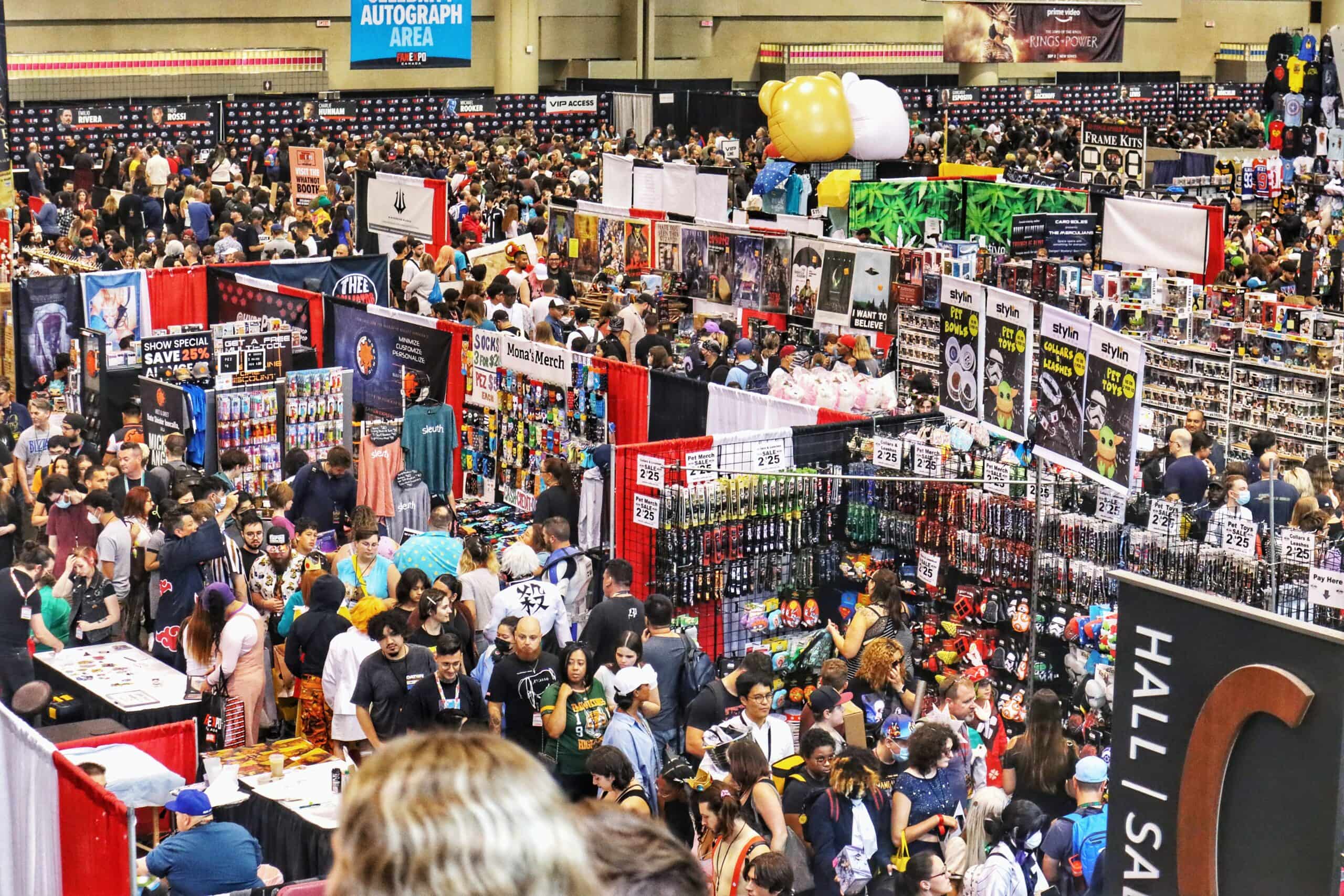
A typical day at Fan Expo, where crowds spill across multiple buildings and floors at the Metro Toronto Convention Centre.

Research

Interviewing the head of security

The Head of Security at Scotiabank Arena shared insights that helped shape our feature decisions.

Insights

• Guards face communication struggles due to many layers of departments
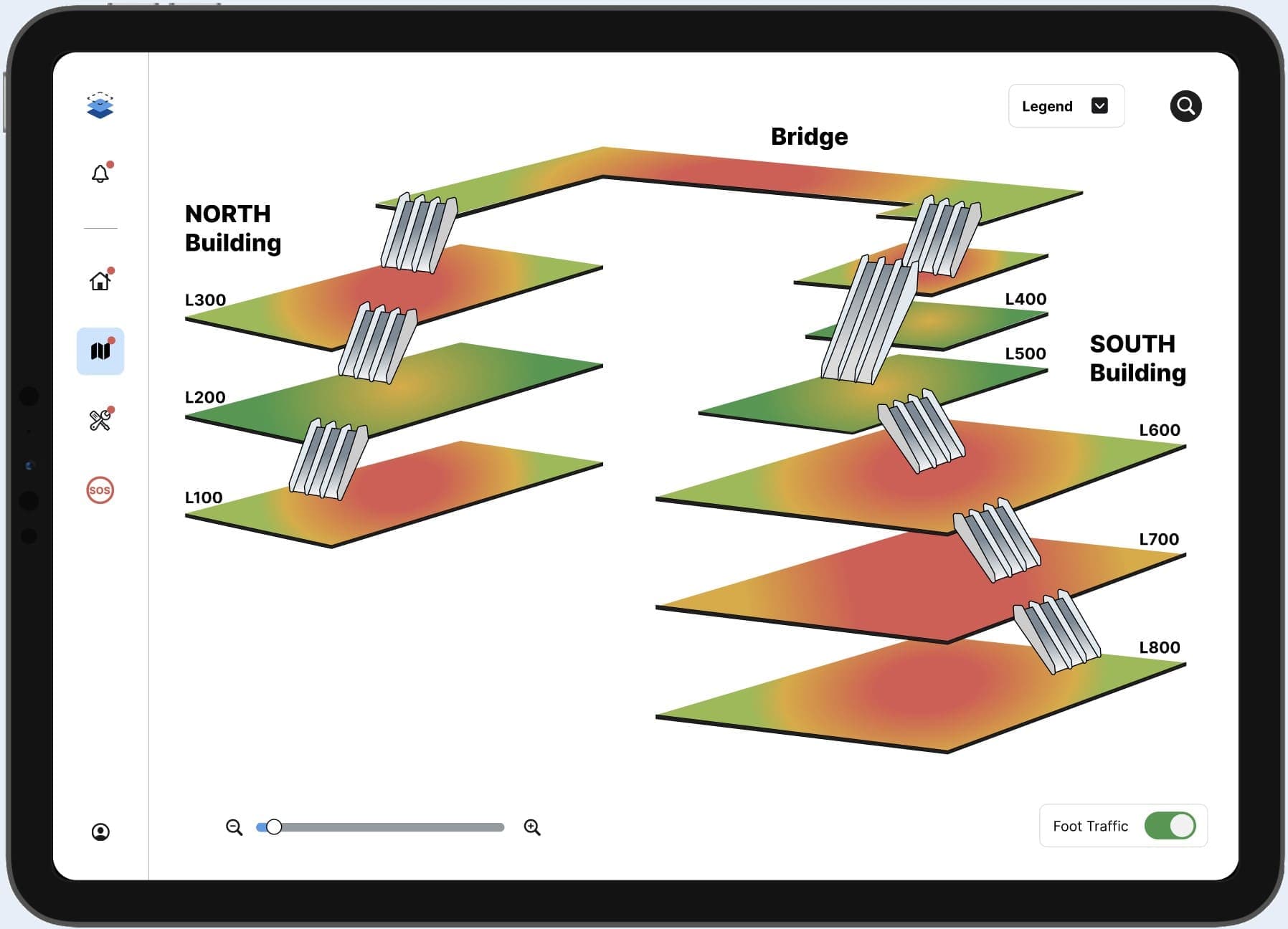
• Collecting real-time foot traffic data can be utilized by senior management
• Emergency response planning must support clear direction for emergency first responders

Ideate

Feature mapping

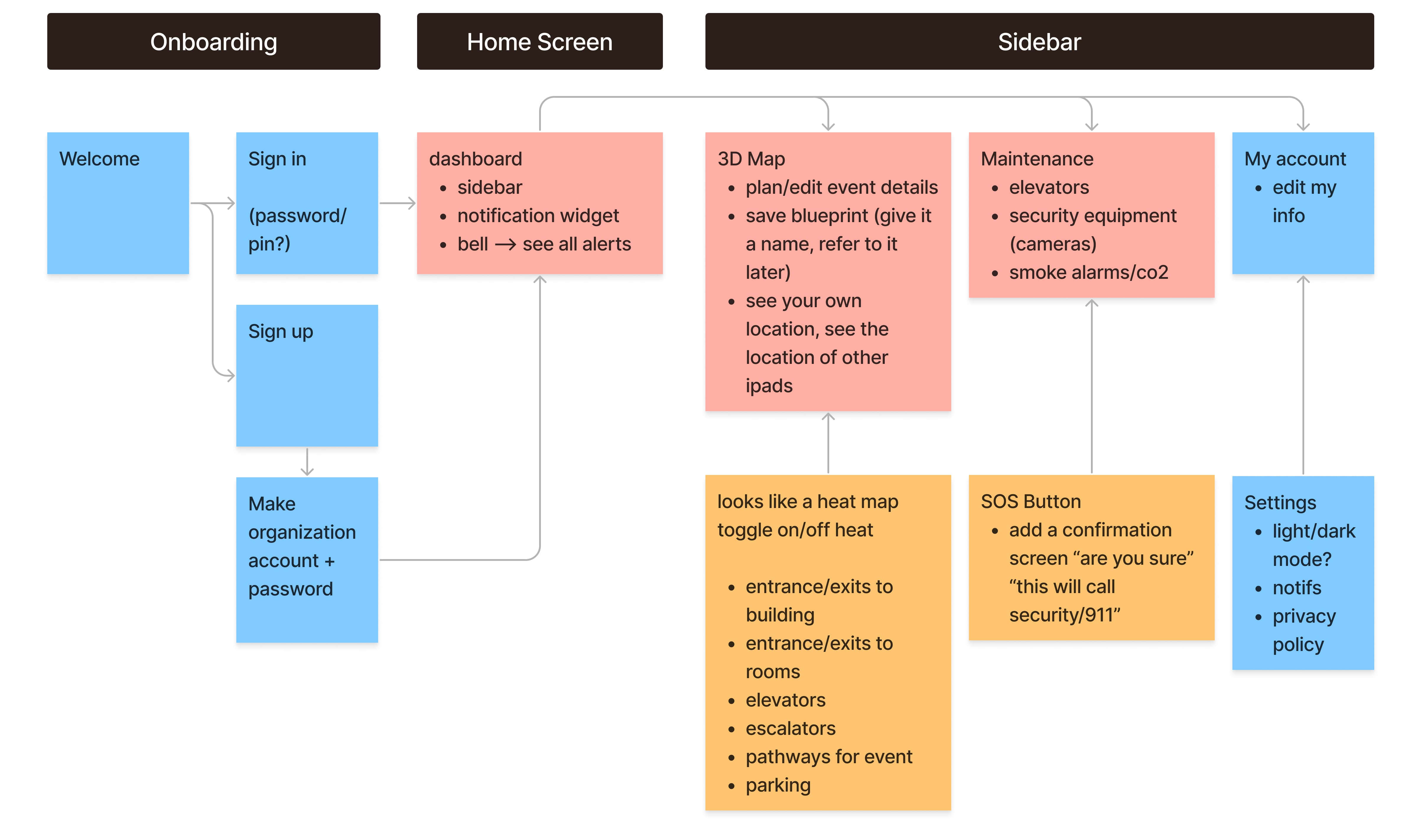
Many sessions of brainstorming and mapping exercises led us to a tablet app that can be carried around.
We asked ourselves, “how can crowds be controlled?” and “what needs to happen before, during and after an event takes place?”
Usability Testing • First Prototype

Feedback was mixed

Students and professors completed scenario-based tasks, playing the role of an event planner. Most were able to complete tasks and navigate, but some screens were confusing.

Insights

• People couldn’t find the emergency feature easily
• Tasks about reviewing venue maintenance were the hardest to complete
• Dashboard crowd shaping suggestions were difficult to process

Usability Testing • First Prototype

Feedback was mixed

Students and professors completed scenario-based tasks, playing the role of an event planner. Most were able to complete tasks and navigate, but some screens were confusing.

Insights

• People couldn’t find the emergency feature easily
• Tasks about reviewing venue maintenance were the hardest to complete
• Dashboard crowd shaping suggestions were difficult to process

Design • Venue Dashboard

Reducing cognitive overload

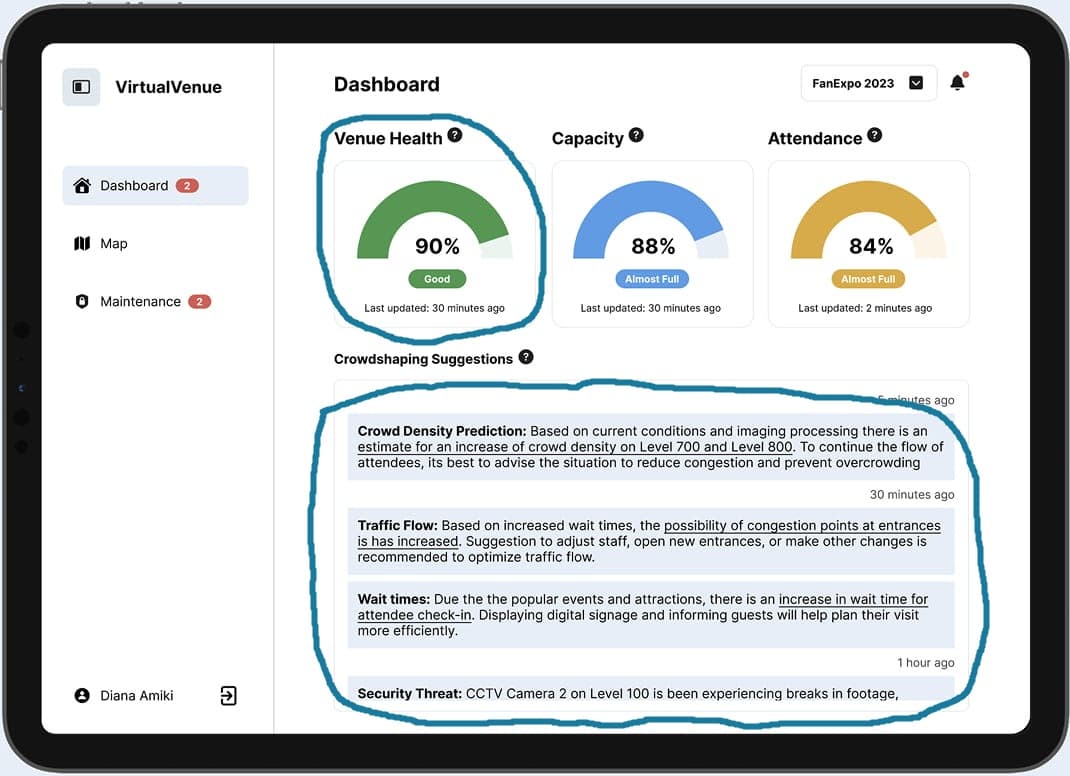
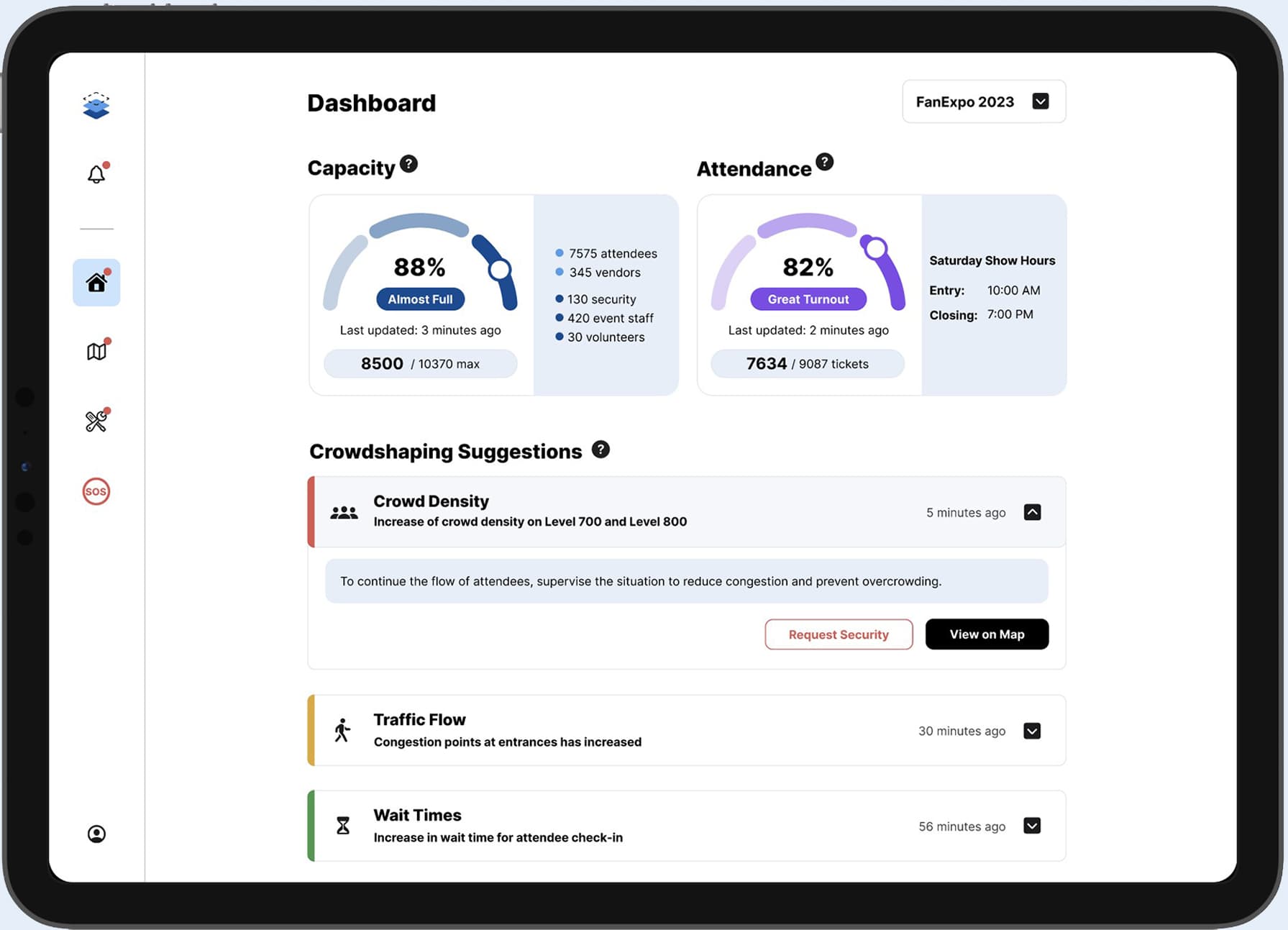
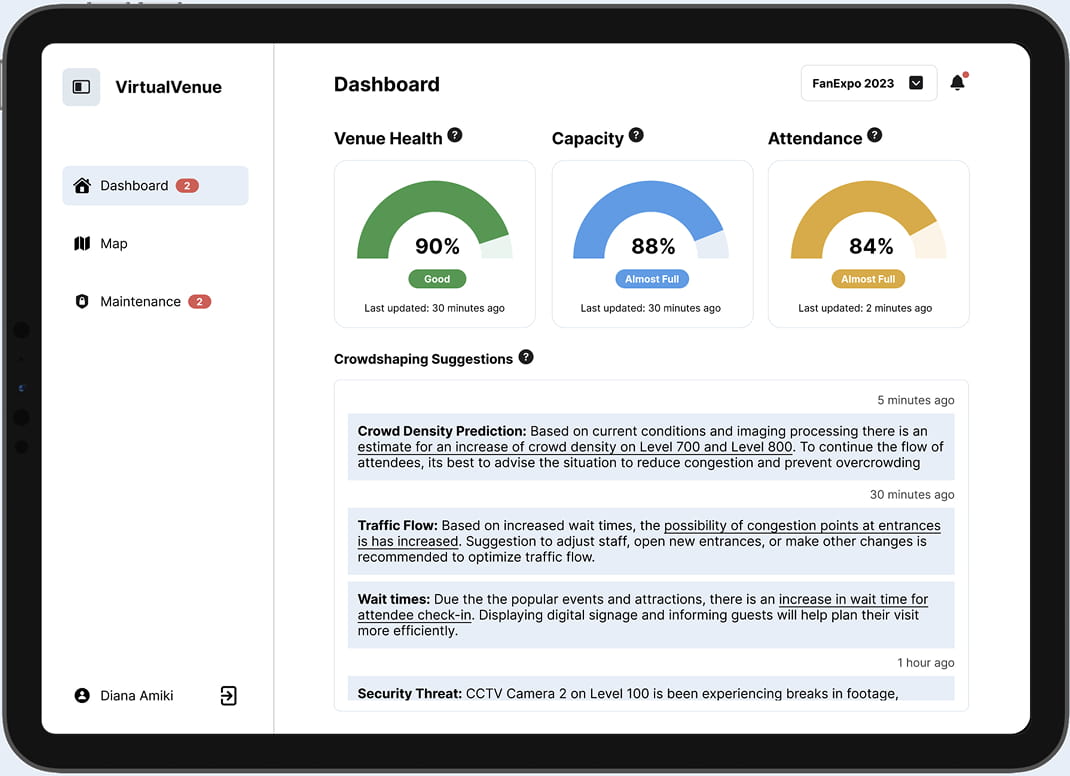
The Dashboard lets all event staff see building capacity, attendee turnout and visibility into crowded areas, all in real time while an event is happening.

Test Prototype

• People weren’t understanding what "Venue Health" meant. It conveyed current status of the building infrastructure (elevators, cameras, ect.)
• Crowdshaping suggestions weren’t easy to understand in a fast-paced testing scenario for a big event.

Final Iteration

• Removed “Venue Health” widget and expanded on capacity and attendance widgets.
• Reorganized the crowdshaping suggestions with dropdowns & CTAs to better address issues.

Design • Venue Dashboard

Reducing cognitive overload

The Dashboard lets all event staff see building capacity, attendee turnout and visibility into crowded areas, all in real time while an event is happening.

Test Prototype

• People weren’t understanding what "Venue Health" meant. It conveyed current status of the building infrastructure (elevators, cameras, ect.)
• Crowdshaping suggestions weren’t easy to understand in a fast-paced testing scenario for a big event.

Final Iteration

• Removed “Venue Health” widget and expanded on capacity and attendance widgets.
• Reorganized the crowdshaping suggestions with dropdowns & CTAs to better address issues.

Design • Venue Maintenance

Improving visual hierarchy

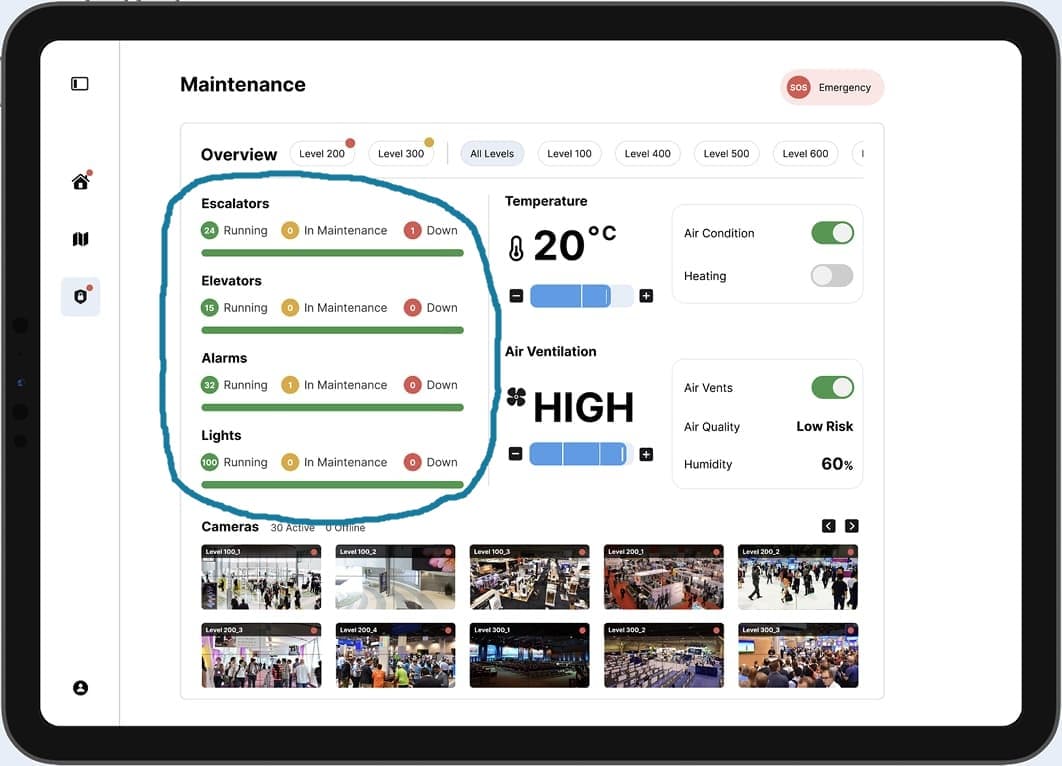
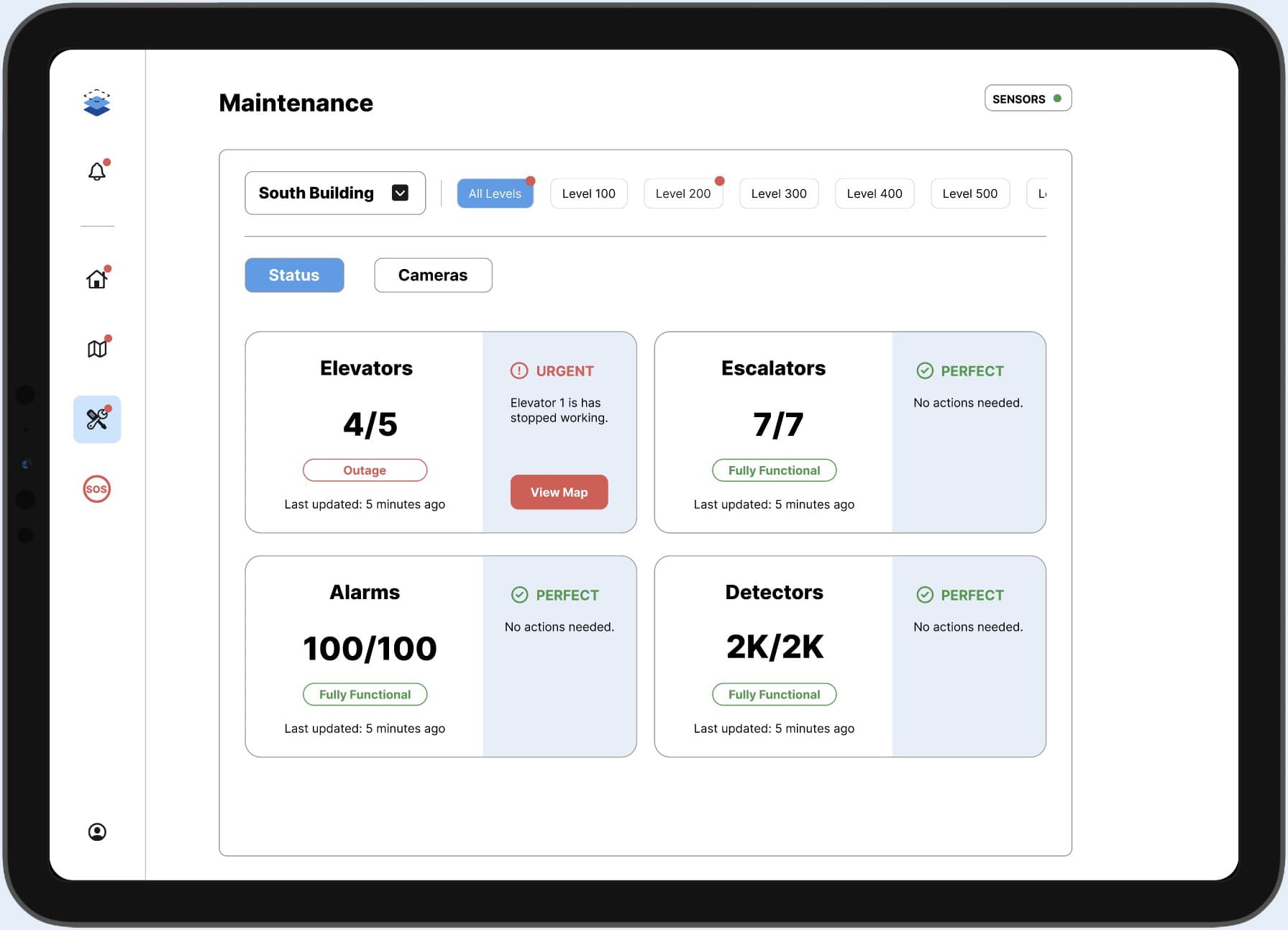
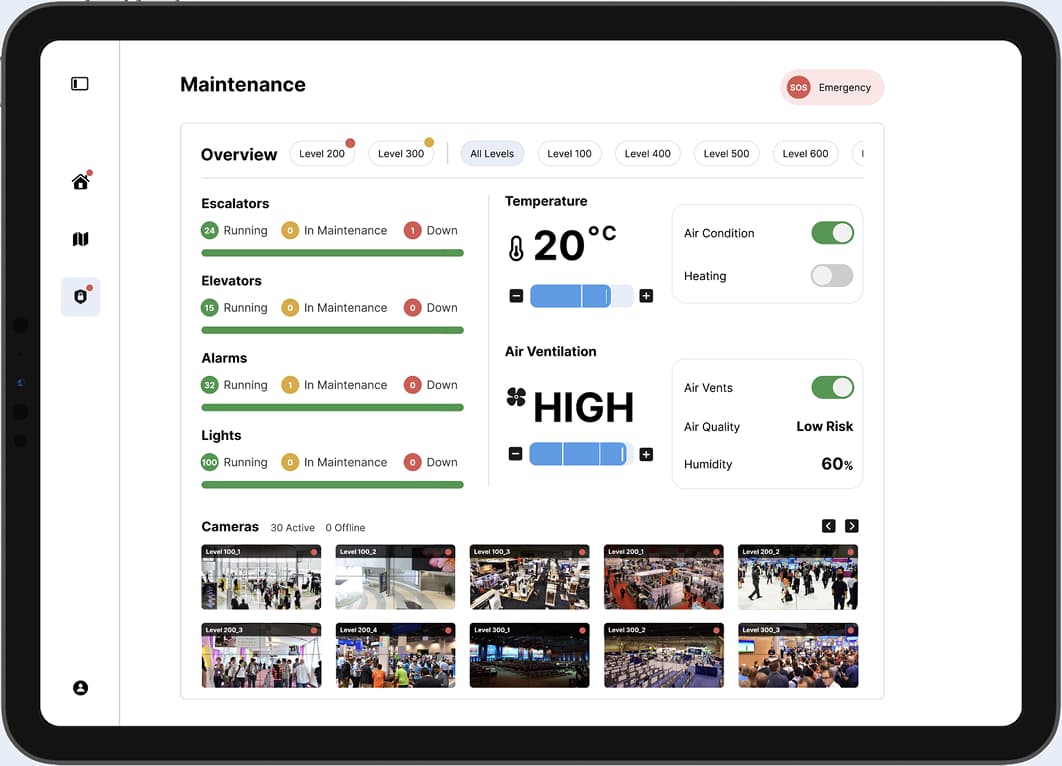
The Maintenance section alerts staff when there are outages in the building that can lead to safety risks. They can see exactly where issues are on the map and through security cameras.

Test Prototype

• The overview of building status on the left was not easily understood during testing.

Final Iteration

• Dedicated cards to building status and added details and CTAs for safety risks.
• Created a sub page for managing security cameras.
• Removed control panel features for temperature and air ventilation.

Design • Venue Maintenance

Improving visual hierarchy

The Maintenance section alerts staff when there are outages in the building that can lead to safety risks. They can see exactly where issues are on the map and through security cameras.

Test Prototype

• The overview of building status on the left was not easily understood during testing.

Final Iteration

• Dedicated cards to building status and added details and CTAs for safety risks.
• Created a sub page for managing security cameras.
• Removed control panel features for temperature and air ventilation.

Design • Emergency Assistance

Faster emergency response

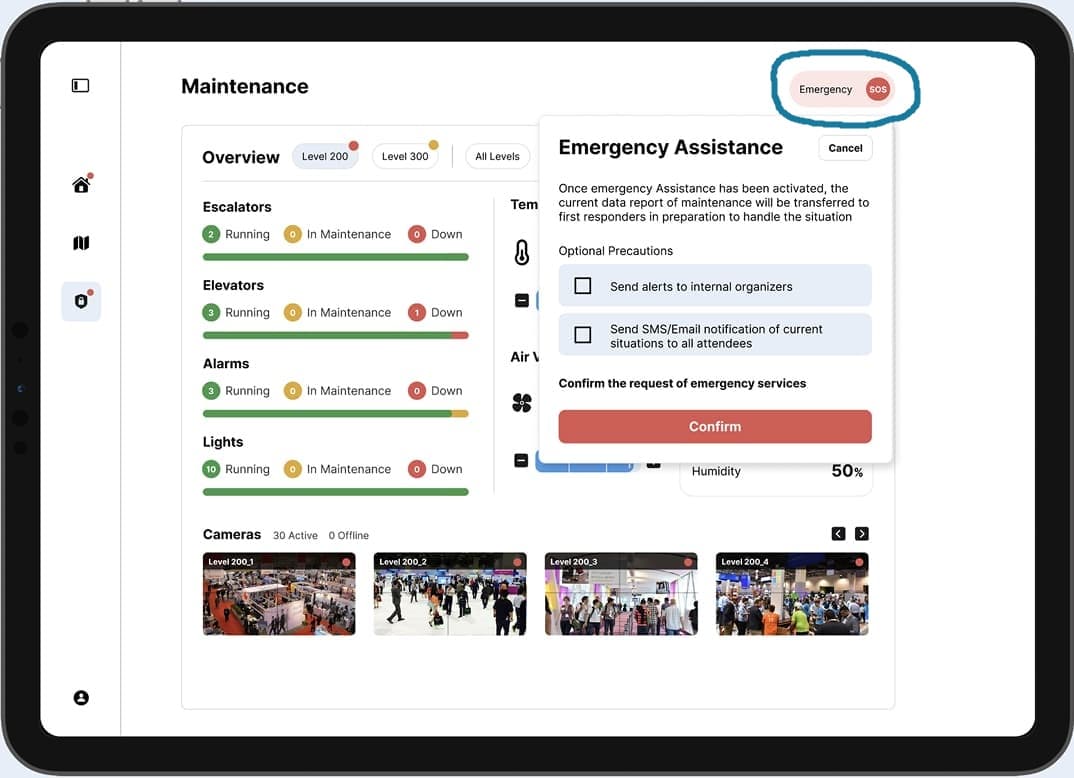
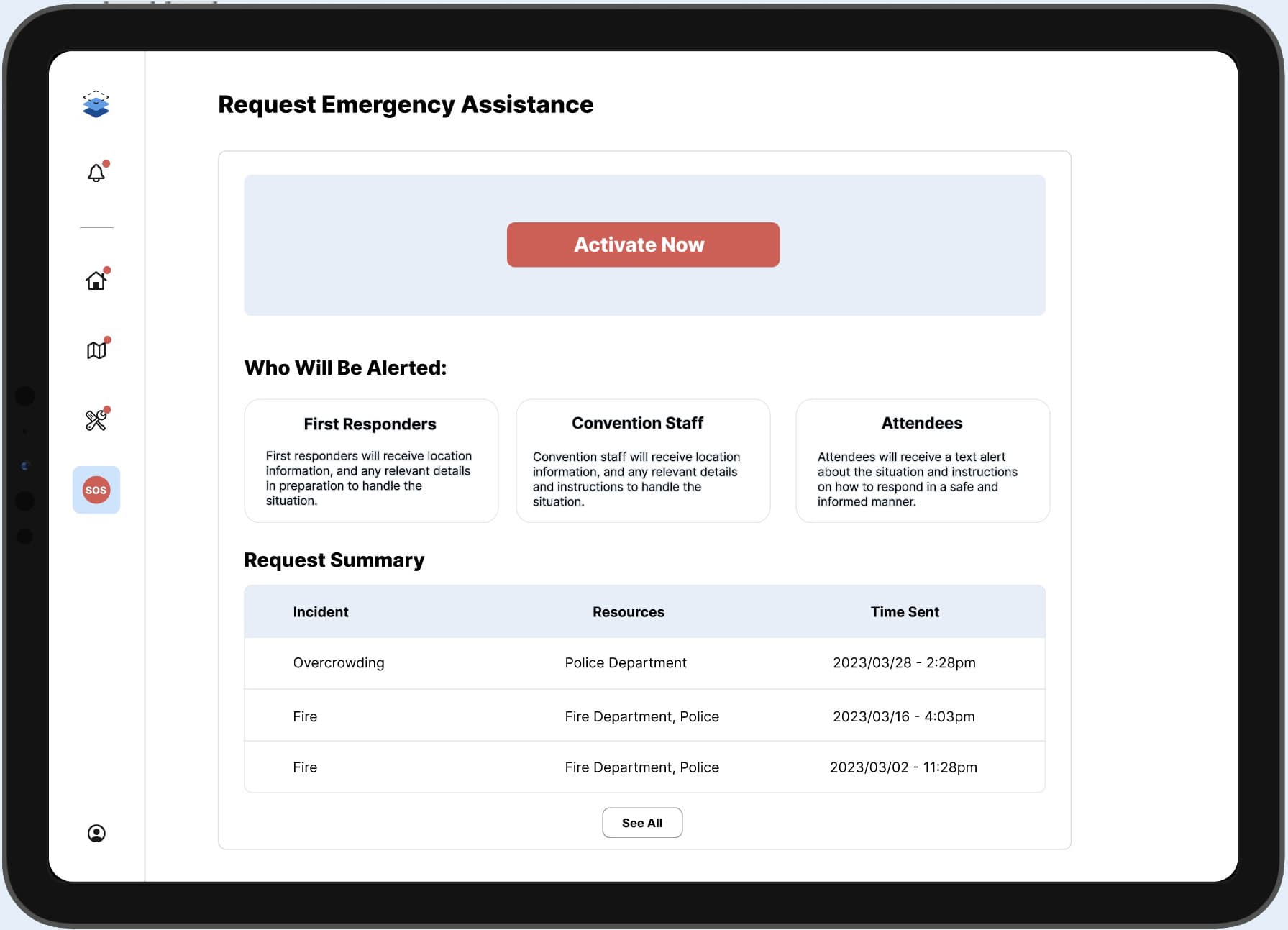
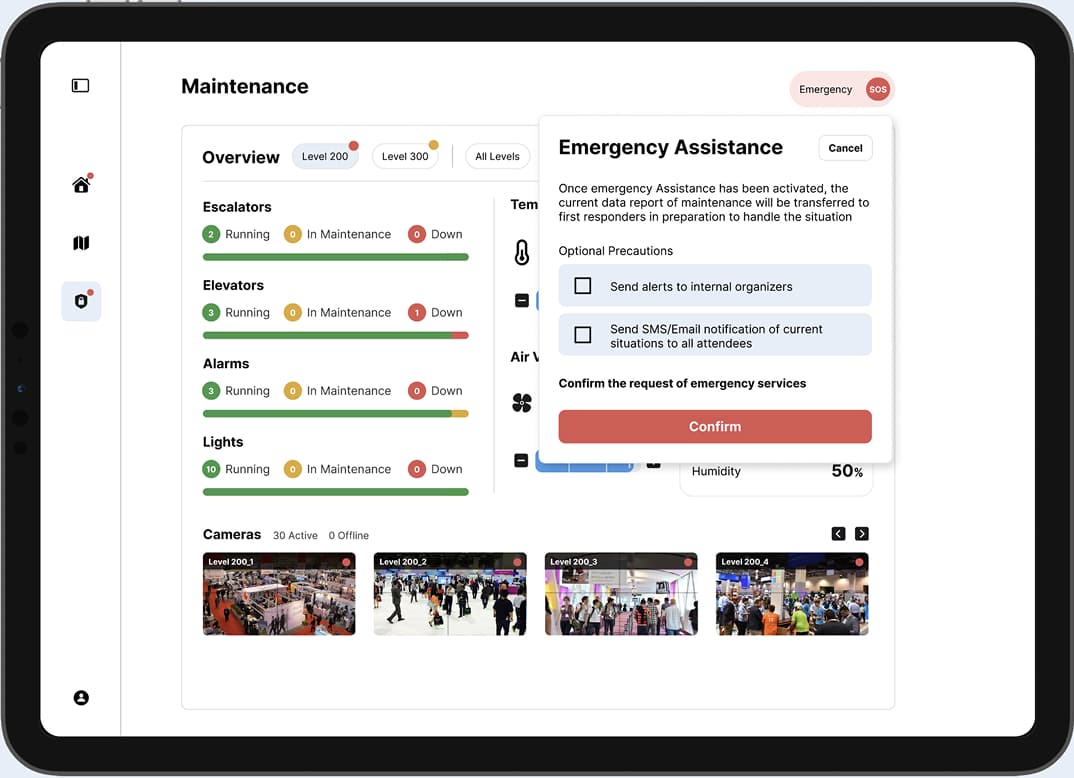
This feature lets staff request emergency assistance for issues like fire or dangerous crowding. After it’s activated, the user fills out further information about the problem that is sent to first responders.

Test Prototype

• The emergency trigger button on the top right wasn’t easy to find within the maintenance page.

Final Iteration

• Dedicated a new page in the side navigation for quicker access.
• The button to call for help is much larger and red is used to grab attention.
• Clarifies that all staff, attendees and emergency responders will be alerted.

Design • Emergency Assistance

Faster emergency response

This feature lets staff request emergency assistance for issues like fire or dangerous crowding. After it’s activated, the user fills out further information about the problem that is sent to first responders.

Test Prototype

• The emergency trigger button on the top right wasn’t easy to find within the maintenance page.

Final Iteration

• Dedicated a new page in the side navigation for quicker access.
• The button to call for help is much larger and red is used to grab attention.
• Clarifies that all staff, attendees and emergency responders will be alerted.

Results

Designing Iteratively

Designing Iteratively

Designing Iteratively

The project received a strong final grade and positive feedback. The QnA after the presentation let us explain our design decisions from testing feedback.

93% final grade overall
Next steps to explore 3D mapping
Reflection
Reflection

Takeaways

Takeaways

Iterating with user feedback

Testing with real users reinforced the value of iterating based on evidence. It helped us improve as designers.

Iterating with user feedback

Testing with real users reinforced the value of iterating based on evidence. It helped us improve as designers.

Iterating with user feedback

Testing with real users reinforced the value of iterating based on evidence. It helped us improve as designers.

Wearing many hats

Taking on multiple responsibilities strengthened my ability to collaborate, adapt, and contribute across disciplines.

Wearing many hats

Taking on multiple responsibilities strengthened my ability to collaborate, adapt, and contribute across disciplines.

Wearing many hats

Taking on multiple responsibilities strengthened my ability to collaborate, adapt, and contribute across disciplines.

Balancing ambition & scope

Considering multiple roles within the event industry in a short timeline required clear prioritization and tradeoffs.

Balancing ambition & scope

Considering multiple roles within the event industry in a short timeline required clear prioritization and tradeoffs.

Balancing ambition & scope

Considering multiple roles within the event industry in a short timeline required clear prioritization and tradeoffs.

Thinking beyond the MVP

Planning for 3D maps, pre- and post-event flows, and new venue types framed the product as scalable beyond an MVP.

Thinking beyond the MVP

Planning for 3D maps, pre- and post-event flows, and new venue types framed the product as scalable beyond an MVP.

Thinking beyond the MVP

Planning for 3D maps, pre- and post-event flows, and new venue types framed the product as scalable beyond an MVP.

Connect with me!

I'm open to new opportunities & meeting designers.

© 2026, Katherine Kotsos

Connect with me!

I'm open to new opportunities & meeting designers.

© 2026, Katherine Kotsos

Connect with me!

I'm open to new opportunities & meeting designers.

© 2026, Katherine Kotsos